Copygram Review covers a trade-copying automation hub that mirrors signals across multiple platforms in real time, helping traders scale execution, manage risk settings, and reduce manual trading errors. In this article, we will explore Copygram Review.
What is Copygram?
- Copygram is a trade-copier and automation hub that helps you replicate trades across multiple trading accounts and platforms, so one signal or one trade can execute everywhere with consistent rules.
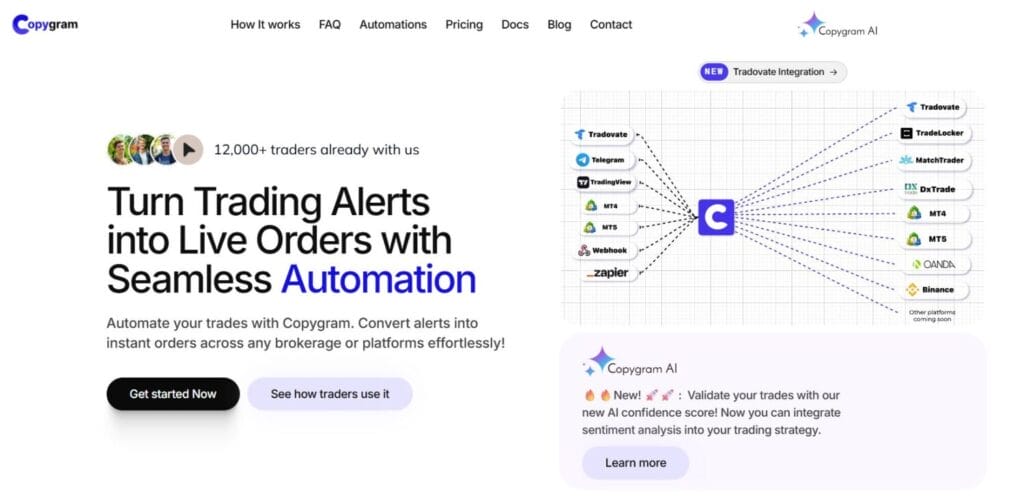
- It supports common “signal sources” like Telegram channels and TradingView alerts, then routes those instructions into supported broker or prop platforms, reducing manual order entry and copy-paste mistakes.
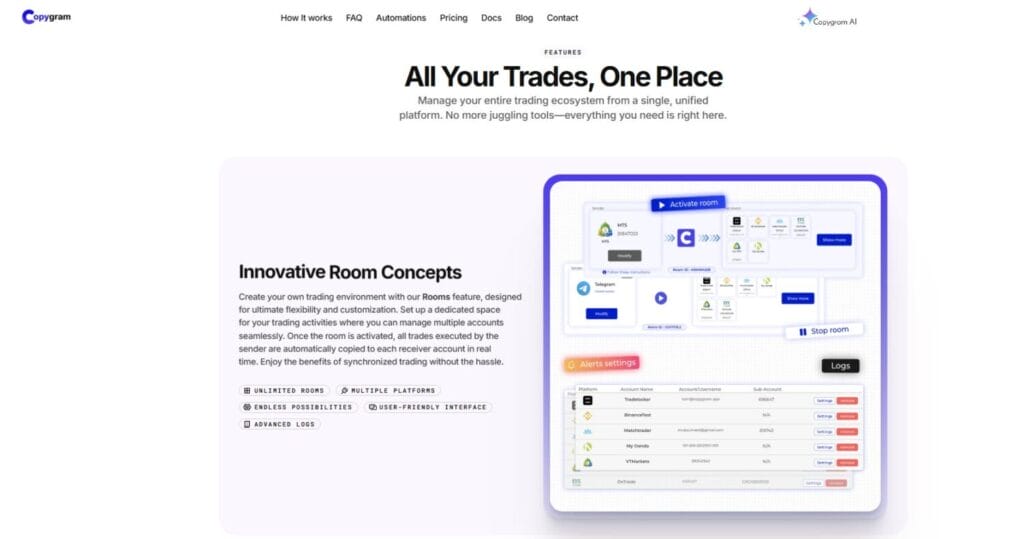
- The core concept is a “Room”, which acts like a command center where one Sender publishes trades and multiple Receivers execute them, with risk controls and sizing rules per receiver.
- Copygram is built to reduce infrastructure burden, since many automations can run without a VPS, meaning your copying logic stays server-side rather than relying on a laptop staying online.
MetaTrader integrations (MT4 and MT5)
- MetaTrader integration typically uses an Expert Advisor connection flow, where you add your MT4 or MT5 account in Copygram, download the EA, attach it to a chart, and enable auto-trading.
- Copygram highlights symbol-handling support, meaning it can deal with broker suffixes and prefixes like “EURUSD.pro” or similar variations, helping copied trades map correctly across different brokers.
- MetaTrader can act as a Sender or a Receiver, which is useful if your primary strategy executes in MT4 or MT5 and you want to replicate trades into other platforms or additional MT accounts.
- MetaTrader is the main case where local terminal configuration matters, because you must allow the Copygram API URL in MT settings and keep the EA running, unlike purely server-side receivers.
Copygram Review: DxTrade integration
- DxTrade integration focuses on using DxTrade as a Receiver account where trades are executed after being generated from MetaTrader, TradingView alerts, Telegram signals, or even Tradovate strategies.
- The setup flow is built around adding a DxTrade trading account in Copygram, then assigning it as a Receiver inside a Room, so it listens continuously for the Sender’s instructions.
- DxTrade is commonly used in funded and prop ecosystems, so the integration is valuable when you want to copy one strategy into multiple prop accounts without manually repeating every entry, stop, and take profit.
- DxTrade receivers work best when your risk settings are normalized per account, because prop rules differ, and Copygram’s per-receiver sizing adjustments help keep each account within its limits.
Copygram Review: TradeLocker integration
- TradeLocker integration is positioned as a Receiver connection, allowing you to route trades from Telegram, TradingView, MetaTrader, or Tradovate into a TradeLocker account with minimal manual steps.
- The typical flow is adding TradeLocker under trading accounts, connecting credentials, then selecting it as a Receiver in a Room, where it mirrors entries, exits, and position changes from the Sender.
- TradeLocker is often used by modern prop firms and broker setups, so Copygram’s appeal here is speed and consistency, especially for fast signal channels where manual execution causes slippage and missed fills.
- This integration is most useful when you set receiver-specific risk multipliers, because TradeLocker accounts can vary by balance, leverage, and prop constraints, and one-size sizing usually breaks quickly.
Match Trade integration (MatchTrader)
- MatchTrader integration works similarly to the other receiver platforms, where you connect your MatchTrader account in Copygram and then attach it to a Room as a Receiver for automated execution.
- The main value is scaling, meaning one Sender can push the same trade idea into multiple receivers, including MatchTrader, which is useful for diversification across firms or testing the same edge under different conditions.
- MatchTrader is sensitive to symbol mapping, stop and limit formats, and execution rules, so the reliability of the copier depends on clean signal formatting, correct symbol pairing, and realistic risk filters.
- This integration fits traders running systematic Telegram signals or TradingView alert strategies who want hands-off execution, but still need oversight through logs and performance review per receiver account.
Copygram Review: Telegram integration
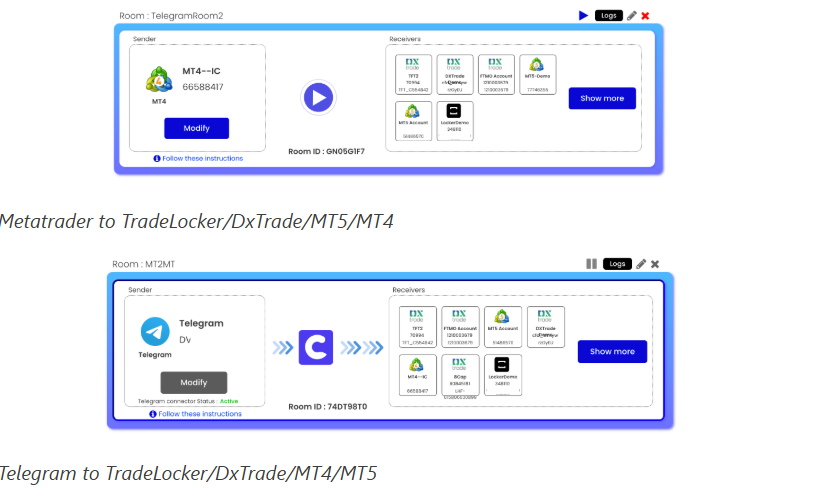
- Telegram integration treats Telegram as a Sender, meaning Copygram reads signals from channels or groups and converts those messages into executable trade instructions, then routes them to your chosen Receivers.
- The setup commonly involves linking your Telegram account, selecting channels in the Room configuration, and then choosing the receiver platforms, so signals flow continuously without manual forwarding or human parsing.
- Copygram positions its Telegram parsing as flexible, aiming to handle many signal formats rather than requiring a strict template, which matters because Telegram signal quality and formatting vary widely.
- Telegram-to-platform copying works best when you add safety rules, like max risk per trade, allowed symbols, and order validation, because Telegram signals can be noisy, ambiguous, or inconsistent.
Copygram Review: Tradovate integration
- Tradovate integration expands Copygram into futures workflows, allowing Tradovate to act as a Sender and enabling Tradovate-originating trades to copy into other supported receiver platforms.
- It also supports Tradovate as a Receiver in some setups, meaning you can route signals from Telegram or TradingView into Tradovate, which is useful for futures traders who want alert-driven execution.
- Tradovate links well with multi-account operations, since futures traders often run evaluation accounts, funded accounts, and personal accounts, and Copygram’s Room model helps manage that replication.
- Futures trading has different order types and margin behavior, so this integration benefits from stricter validation rules, such as limiting instruments, avoiding thin times, and applying consistent position sizing logic.
Copygram Review: Oanda integration
- Oanda integration is designed for traders who want to execute copied trades on a well-known FX and CFD venue, typically using Oanda as a Receiver for Telegram signals or TradingView alerts.
- Oanda receivers can help with diversification and execution consistency, especially if your strategy is FX-focused and you want a stable broker environment compared with fragmented prop setups.
- The key operational need is correct instrument mapping, sizing rules, and risk limits, because Oanda’s instrument naming and contract sizing can differ from MetaTrader brokers and other receiver platforms.
- Oanda is best used with conservative safety filters, including max leverage exposure and mandatory stop-loss enforcement, because copiers can amplify mistakes quickly when multiple accounts execute simultaneously.
Table: Supported automation routes
| Sender source | Typical receiver targets | What this enables |
| Telegram | MT4/MT5, DxTrade, MatchTrader, TradeLocker, Oanda, Tradovate | Signal channels become automated execution across multiple account types |
| TradingView alerts | MT4/MT5, DxTrade, MatchTrader, TradeLocker, Oanda, Tradovate | Rule-based alerts become trades, ideal for systematic strategies |
| MetaTrader MT4/MT5 | MT4/MT5, DxTrade, MatchTrader, TradeLocker, Oanda, Tradovate | Copy a live MT strategy into multiple brokers and prop platforms |
| Tradovate | MT4/MT5, DxTrade, MatchTrader, TradeLocker, Oanda, Tradovate | Futures master account replicates trades to other linked accounts |
Copygram Review: Pricing
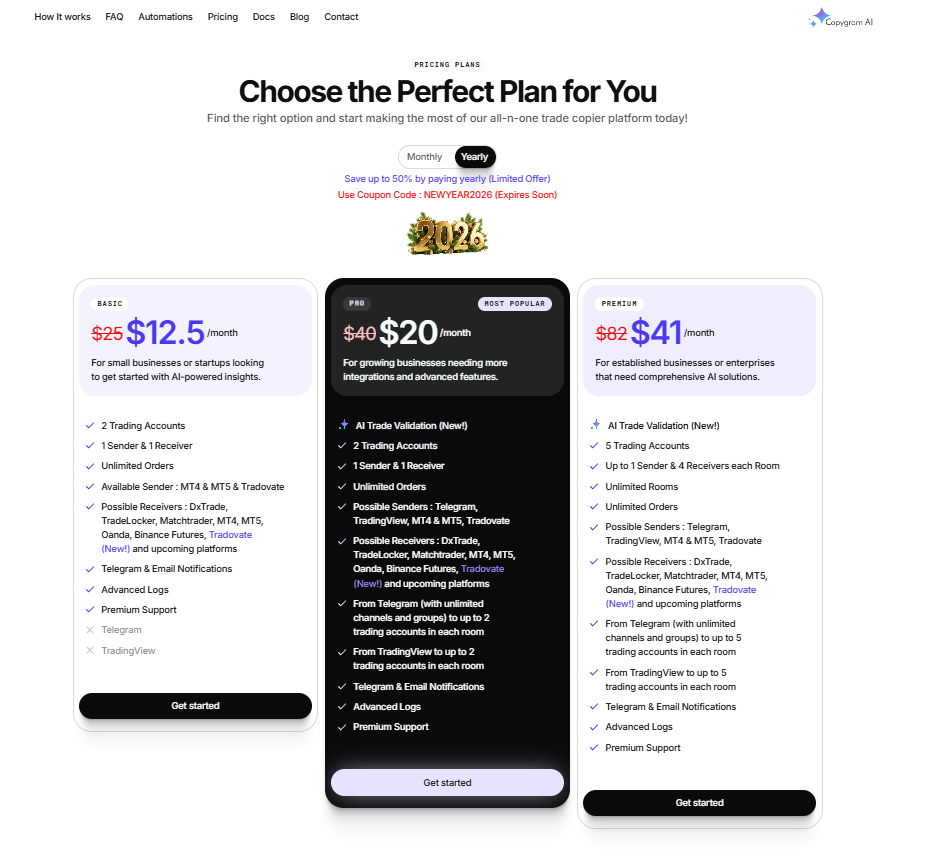
- Copygram offers three pricing tiers: Basic at $12.5/month billed yearly instead of $25, Pro at $20/month billed yearly instead of $40, and Premium at $41/month billed yearly instead of $82.
- Annual billing is positioned as the better-value option, with the page stating users can save up to 50% by paying yearly instead of monthly.
- A promotional discount is also advertised, with the coupon code NEWYEAR2026, suggesting Copygram is actively using limited-time offers to reduce entry cost further.
- The pricing scales by account capacity and integrations: Basic includes 2 trading accounts, Pro includes 2 trading accounts plus AI Trade Validation, and Premium expands to 5 trading accounts with broader sender/receiver capacity.
- Higher plans focus on advanced automation and room usage, with Pro and Premium supporting more senders/receivers, more trading accounts per room, and broader platform coverage such as Telegram, TradingView, MT4/MT5, Tradovate, DXTrade, TradeLocker, MatchTrader, cTrader, and Binance Futures.
Copygram Review: Conclusion
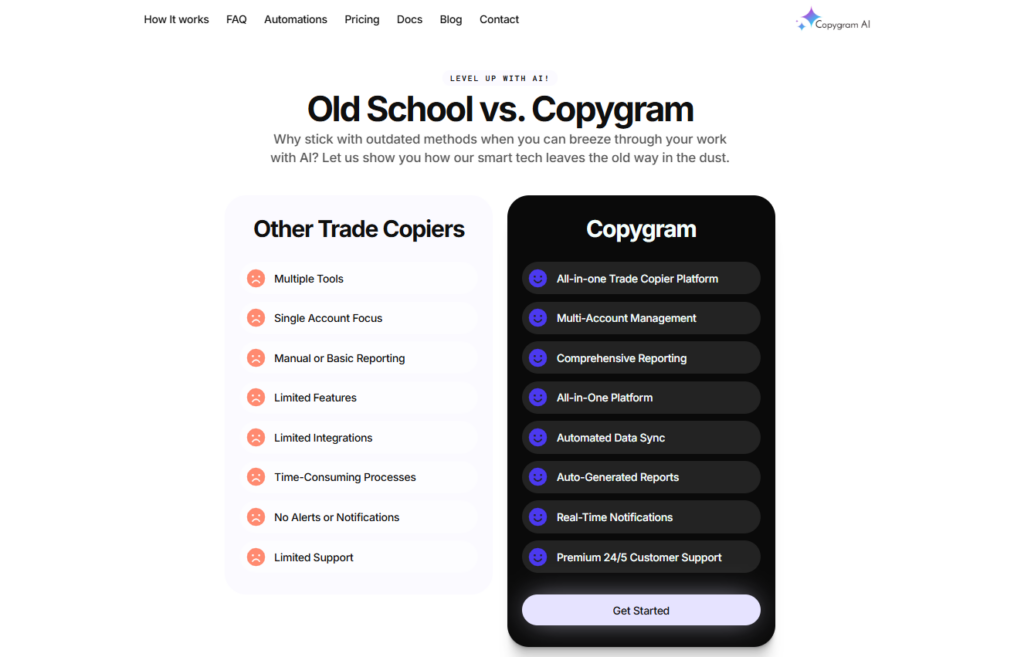
Copygram is best for traders who want to scale one strategy across many accounts without manual execution, especially when signals come from Telegram or TradingView and must be acted on instantly. Its Room model makes the workflow clear: one sender, multiple receivers, and rule-based controls that reduce sizing mistakes across platforms. The biggest practical benefit is removing the VPS dependency for many automation routes, which lowers setup friction for newer users and teams. Still, trade copiers amplify errors as fast as they copy winners, so strict risk caps, instrument filters, and logging reviews are essential before going fully hands-off.
Can I copy trades from Telegram signals to my broker account?
Yes. Telegram can be used as a Sender, and you can route those signals to supported receivers such as MetaTrader, DxTrade, MatchTrader, TradeLocker, Oanda, and Tradovate using Room rules.
Can TradingView alerts be copied into live trades?
Yes. TradingView alerts can act as a Sender and Copygram can route those alerts into supported receiver platforms, making it useful for rule-based strategies and automated setups.
Can MetaTrader be both the Sender and Receiver?
Yes. MetaTrader can send trades to other accounts and also receive copied trades, which helps if your master strategy runs in MT4 or MT5 and you want multiple linked accounts.