Do you like having a second screen with your computer setup? What if your laptop could carry a second screen for you? That’s the idea behind Lenovo’s latest proof of concept, the ThinkBook Modular AI PC, announced at Mobile World Congress in Barcelona.
Lenovo is never shy to show off wacky, weird concept laptops. We’ve seen a PC with a transparent screen, one with a rollable OLED screen, a swiveling screen, and another with a flippy screen. At CES earlier this year, the company showed off a gaming laptop with a display that expands at the push of a button. Sometimes, these concepts turn into real products that go on sale (often in limited quantities).
At MWC 2026, Lenovo trotted out three concepts. While it’s unclear whether any of them will become real, purchasable products, there’s some unique utility here, and a peek at how computing experiences could change in the future.
A Laptop With a Built-In Portable Screen
.jpg)

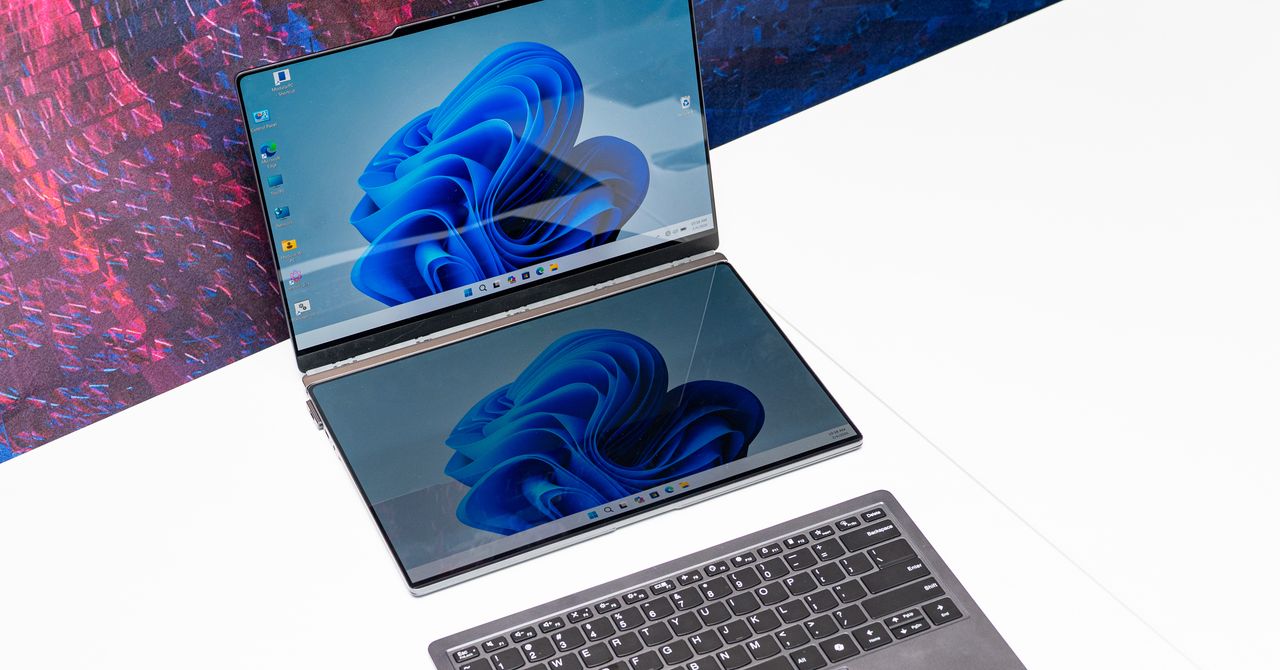
As someone with a multi-screen setup at home and a fondness for portable monitors, the ThinkBook Modular AI PC appeals to me the most. At first glance, it looks like a normal laptop. Take a look behind, and you’ll notice there’s a second screen magnetically hanging off the back of the laptop, like a koala carrying a baby on its back.
The screen is connected to the laptop using pogo-pin connectors, so you can use it in this state to display content to people in front of you, say, if you were making a presentation during a meeting. Alternatively, you can pop this second screen off, remove a hidden kickstand resting under the laptop, and magnetically attach it to the 14-inch screen so that you have a traditional portable monitor experience. (You’ll need to connect this to the laptop via a USB-C cable in this orientation.)
If you don’t have the desk space for that orientation, you can always remove the keyboard from the base and pop the second screen there—it’ll auto-connect to the laptop via the pogo pins, and you’ll be able to use the Bluetooth keyboard to type on a dual-screen setup that resembles the Asus ZenBook Duo. The whole system is a fantastically portable method of improving productivity on the go, and the laptop isn’t too thick or cumbersome.